
Exam C_S43 Topic 1 Question 9 Discussion
Actual exam question for SAP's C_S43 exam
Question #: 9
Topic #: 1
Question #: 9
Topic #: 1
Task 4: Configure and create Technical Objects
The project team evaluates during the implementation project Technical Object structures in SAP S/4HANA Asset Management. The following features need to be checked:
* Configure and create Functional Locations
* Create, serialize and install Equipment
* Create Functional Location master record ZZ0##-01 and save it. Use the following information:

* Create Equipment master record EQUI-## and save it. Use the following information:

* Serialize the just created Equipment master record EQUI-## . Use the following data:

* Install Equipment EQUI-## at the Functional Location 00-01-ASS-02 .
The project team evaluates during the implementation project Technical Object structures in SAP S/4HANA Asset Management. The following features need to be checked:
* Configure and create Functional Locations
* Create, serialize and install Equipment
* Create Functional Location master record ZZ0##-01 and save it. Use the following information:
* Create Equipment master record EQUI-## and save it. Use the following information:
* Serialize the just created Equipment master record EQUI-## . Use the following data:
* Install Equipment EQUI-## at the Functional Location 00-01-ASS-02 .
Suggested Answer:
See the Explanation for complete Solution of this Task.
Explanation:
Task 4: Configure and create Technical Objects
This task evaluates your ability to structure and manage the physical and functional hierarchy of assets in SAP S/4HANA Asset Management.
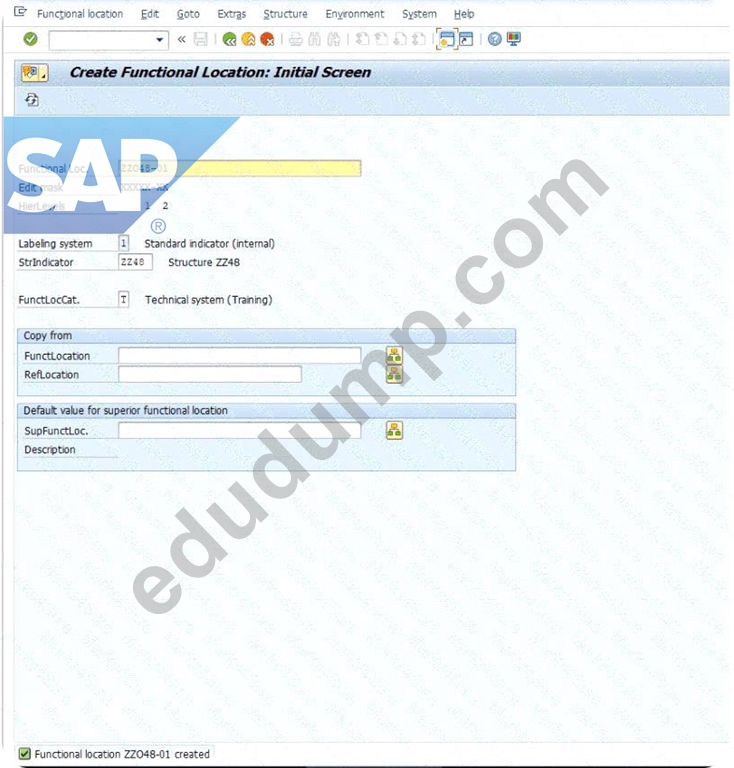
Step 1: Create Functional Location Master Record
A Functional Location represents the area at which a maintenance task is to be performed.
* Access the Transaction : Use transaction code IL01 (Create Functional Location).
* Enter Initial Data :
* Functional Location : ZZ048-01.
* Structure Indicator : ZZ48.
* Functional Location Category : T.
* Press Enter .

* Enter General Data :
* Description : Production Line Z48.
* Enter Location and Organization Data :
* Maintenance Plant : 1020.
* Cost Center : 4110.
* Planning Plant : 1020.
* Planner Group : Z48.
* Main WorkCtr : T-ME48.
* Work Center Plant : 1010.
* Save : Click the Save icon.
Explanation : By creating this record, you define a specific functional area within Plant 1020 where maintenance costs and history will be tracked for all equipment installed there.

Step 2: Create Equipment Master Record
Equipment represents an individual physical object that is maintained as an autonomous unit.
* Access the Transaction : Use transaction code IE01 (Create Equipment).
* Enter Initial Data :
* Equipment : EQUI-48.
* Equipment Category : T.
* Press Enter .

* Enter General Data :
* Description : Drive Motor GR48.
* Save : Click the Save icon.
Explanation : This step creates a master record for a physical asset-a drive motor-allowing you to track its individual lifecycle, independent of where it is currently installed.


Step 3: Serialize the Equipment
Serialization links a piece of equipment to a specific material and unique serial number for inventory management and tracking.
* Access the Transaction : Use transaction code IE02 (Change Equipment) and enter EQUI-48.
* Navigate to Serial Data : Go to the SerData (Serial Data) tab.
* Enter Serialization Data :
* Material : T-PM8000.
* Serial Number : EQUI-48.
* Save : Click the Save icon.
Explanation : Linking the motor to Material T-PM8000 enables the system to track this specific asset as a serialized part, which is essential for warehouse movements and warranty tracking.

Step 4: Install Equipment at a Functional Location
This establishes the relationship between the physical asset (Equipment) and the functional area where it is operating.
* Access the Transaction : Use transaction code IE02 (Change Equipment) for EQUI-48.
* Modify Installation Location :
* Click on the Structure tab.
* Find the FunctLoc field.
* Enter the location: 00-01-ASS-02.
* Save : Click the Save icon.
Explanation : This installation "plugs" your drive motor into the functional hierarchy at location 00-01-ASS-02. From this point forward, any maintenance performed on this motor will be automatically associated with that location's history.
Explanation:
Task 4: Configure and create Technical Objects
This task evaluates your ability to structure and manage the physical and functional hierarchy of assets in SAP S/4HANA Asset Management.
Step 1: Create Functional Location Master Record
A Functional Location represents the area at which a maintenance task is to be performed.
* Access the Transaction : Use transaction code IL01 (Create Functional Location).
* Enter Initial Data :
* Functional Location : ZZ048-01.
* Structure Indicator : ZZ48.
* Functional Location Category : T.
* Press Enter .
* Enter General Data :
* Description : Production Line Z48.
* Enter Location and Organization Data :
* Maintenance Plant : 1020.
* Cost Center : 4110.
* Planning Plant : 1020.
* Planner Group : Z48.
* Main WorkCtr : T-ME48.
* Work Center Plant : 1010.
* Save : Click the Save icon.
Explanation : By creating this record, you define a specific functional area within Plant 1020 where maintenance costs and history will be tracked for all equipment installed there.
Step 2: Create Equipment Master Record
Equipment represents an individual physical object that is maintained as an autonomous unit.
* Access the Transaction : Use transaction code IE01 (Create Equipment).
* Enter Initial Data :
* Equipment : EQUI-48.
* Equipment Category : T.
* Press Enter .
* Enter General Data :
* Description : Drive Motor GR48.
* Save : Click the Save icon.
Explanation : This step creates a master record for a physical asset-a drive motor-allowing you to track its individual lifecycle, independent of where it is currently installed.
Step 3: Serialize the Equipment
Serialization links a piece of equipment to a specific material and unique serial number for inventory management and tracking.
* Access the Transaction : Use transaction code IE02 (Change Equipment) and enter EQUI-48.
* Navigate to Serial Data : Go to the SerData (Serial Data) tab.
* Enter Serialization Data :
* Material : T-PM8000.
* Serial Number : EQUI-48.
* Save : Click the Save icon.
Explanation : Linking the motor to Material T-PM8000 enables the system to track this specific asset as a serialized part, which is essential for warehouse movements and warranty tracking.
Step 4: Install Equipment at a Functional Location
This establishes the relationship between the physical asset (Equipment) and the functional area where it is operating.
* Access the Transaction : Use transaction code IE02 (Change Equipment) for EQUI-48.
* Modify Installation Location :
* Click on the Structure tab.
* Find the FunctLoc field.
* Enter the location: 00-01-ASS-02.
* Save : Click the Save icon.
Explanation : This installation "plugs" your drive motor into the functional hierarchy at location 00-01-ASS-02. From this point forward, any maintenance performed on this motor will be automatically associated with that location's history.
by Claire at May 26, 2026, 11:06 PM
0
0
0
10
Comments
Upvoting a comment with a selected answer will also increase the vote count towards that answer by one. So if you see a comment that you already agree with, you can upvote it instead of posting a new comment.
Report Comment
Commenting
You can sign-up / login (it's free).